To register for an event or for more information, click the link for any event. All times are Pacific Time.
Questions? Email [email protected]

I have tried so many research logs in the past and I just can’t keep up with them. If you haven’t used one, or don’t know what one is, it’s basically a tracking tool used to document research. It records where you have searched, what you found (or did not find), and your future research goals. It’s supposed to help you stay organized and avoid looking at the same things over and over again.
I think I’m more of a fly-by-the-seat-of-my-pants genealogist. I love going off in la-la-land of research with just Post-It notes and scribbles as breadcrumb. I don’t love it later when I try to document, but at the time? Nothing like a snack, a cup of late-night tea, and a clue. But I want to create something that maybe I’ll use, so thought I’d bring you along for the ride.
Generally, genealogy research logs have the following components:
- An objective- what is the question or person you are investigating
- Details of each search- when did you look, where did you look, what kind of record was it)
- Results of the search- even NEGATIVE results (so you don’t keep looking in the same place year after year)
- Citations- enough info to write out your citation later
- Comments- what does this tell you and does it hint at other records or discrepancies
My current log, that I made and do not use, is in Excel. I love to organize in Excel, but when I’m galivanting around records, I’m a pen and paper person. And then once I’m done, I log it all in my FTM, so I don’t really need that Excel for this. Which brings me to my first decision:
What is the format of my new log?
- Excel– I could have stuck with Excel, but I already know I don’t use it.
- Apps– There are special apps you could use for notetaking- Evernote, OneNote (part of Microsoft Office Suite), Notion. I use OneNote at work and it would be perfect here, but often I’m doing my genealogy away from my desk with two screens. I feel like if I have to copy, move to another view, paste, and then move back to the first view, I will lose my mojo. So I think I’ll create something in OneNote for when I’m at my desk, but that won’t be my only log.
- Genealogy Program– Most genealogy programs also have built-in research logs, but honestly, I know I won’t be using that; they are far too organized and structured for my brain when I’m on the genealogy hunt endorphins.
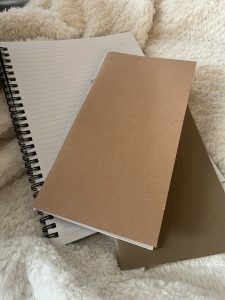
- Old-School Notebooks- A5 (Moleskine-type)– I could also continue to use the 5,670 Moleskine-type notebooks that I have (yes, I have a stationery problem). The trouble for me with the larger notebooks is that I go rogue. 12 pages on Smith and then a random Jones page thrown in before moving on to a story my dad told me. The ones I use are the cheap Amazon ones you get in bulk. They even take fountain pen ink well. https://www.amazon.com/dp/B0DBDLJ8LT?ref_=ppx_hzsearch_conn_dt_b_fed_asin_title_12&th=1
- Travelers-Size Notebooks- Moving to the smaller travelers notebook size could put my genealogy into more manageable chunks. I also like to think of these logs as a travel diary of where I’ve been and what I’ve done while searching for stories so the idea also works. Here are the one’s I use: https://www.gouletpens.com/products/travelers-notebook-regular-refill-002-grid
Decision:
✔ I will set up a OneNote for structured, computer-based research
✔ AND a traveler’s notebook (TN) for on-the-go genealogy.
What structure do I want to include?
I know that I don’t want too much structure, but I also know I need some. In my TN, I will want to be able to jot things down easily. For example, OneNote may have a page for each census record and a picture or notes of what was found. Whereas my TN will just say, “1870 census in Ursa, Adams, Illinois age 2 with parents and brother John P. NOTE: Check C.A. as first name- seems to be called that a lot.”
In OneNote, when I’m at my computer, cutting and pasting will be easier, so I can go with more structure. I’d like to have at the top of a note the following reminders and then in my TN, I can make a sticker with this and put it on the first page as a reminder:
- Research question
- Website, archive, database, or book and why I’m looking there
- What I searched (terms, dates, filters, spelling variations)
- What I found
- What I didn’t find
- Notes, patterns and feelings (I get a lot of feelings when going through records and, just like in a travel journal, why not record them: “I noticed that there was a baby in this record and I never heard of this baby. Did this baby die? How did my grandma feel about having a 2 year old and then a baby that didn’t make it to the next year?”
- Ideas for next step
Other Ideas:
- In the Family Group Sheet I created in Excel, I have a research checklist. This helps me stick with one family and make sure that I follow them in each of the records. I have found this very helpful, so I will also keep this in my OneNote and use it when I’m fine-tuning from my TNs. I have a link to it here: https://www.dropbox.com/home/Public?preview=Research+Checklist.xls
- I could color-code both. OneNote I could use online highlights and in my TN, I could use the many colors of highlighters I have (again, stationery problem…). Themes could be things that need to be followed-up on, things that are new, things that need to be transferred.
Are you good at sticking to your research log? If not, are there parts you use consistently? I would love some more ideas, as I feel this is a work in progress.
Links to some standard research logs:
- https://www.familysearch.org/en/wiki/Keeping_a_Research_Log
- https://www.family-tree.co.uk/how-to-guides/make-a-research-log/
- https://easygenie.org/blogs/news/why-arent-you-using-a-genealogy-research-log?srsltid=AfmBOoqQMg7fV25b-NAB27EcId6XypOaCfQaSrtCHRZfjOOsU5gExWoZ
- https://www.americanancestors.org/sites/default/files/2026-01/research-log.pdf
Helpful Links
Events: https://www.californiaancestors.org/events-and-education/
Special Interest Groups: https://www.californiaancestors.org/special-interest-groups-for-members/
Calendar view: https://www.californiaancestors.org/cgs_calendar/
Tips & Talk: Oakland FamilySearch Center Family History Classes: https://www.familysearch.org/en/centers/oakland_california/classes