
Glad tidings! The holiday volunteer potluck is back

by Jennifer Dix (11/19/2022)

3 Snowmen

All CGS volunteers, past, present, and potential, are cordially invited to an informal holiday gathering!

Details:

Sunday, December 4

11 a.m. – 2 p.m.

In Lafayette

Come join your friends and meet other volunteers! Please bring a dish to share: fruit, appetizers, bread, dessert, beverage – whatever suits your fancy

Sign up HERE or contact Linda Okazaki for directions

Guests must be vaccinated. Bring a sweater as windows will be open; if the weather is nice, we can celebrate outdoors.

CGS Committees: Development & Member Services

by Chris Pattillo (11/19/2022)

Three women standing by table

Arlene Miles, Nancy Cork and Shirley Hoye at a pre-COVID quarterly membership meeting

One in a series of blog posts about CGS committees and their work

The Development and Member Services Committee does not require an enormous time commitment, but it plays a vital role in the social life of CGS and bringing members together. Largely due to the pandemic disruption of in-person gatherings, the committee is currently inactive and in need of a new chair. I had been the chair but stepped down when I took over the Library Committee.

PurposeThe purpose of the Development and Member Services Committee is just what the name implies. It focuses on developing new members and then serving their needs
ChairCurrently vacant
MeetsOnce a month
Time CommitmentWhen I chaired the committee, our meetings lasted about one hour but we typically had lunch together after the meeting.
Helpful SkillsBeing a friendly person.
Work LocationMost recently meetings were held off site.

Recent active members included Kathleen Beitiks, Sandy Fryer, Jane Lindsey, Jan Rubin, Maureen Hanlon and Barbara Valdriz.

Cultivating new members has been challenging during COVID but now that things are loosening up and we are having a few more in-person gatherings, that will improve. I hope many of our members are planning to join us for a holiday gathering at Linda Okazaki’s home in December! The library will soon be open one Saturday of the month in addition to our regular weekdays, so that will be another opportunity to interact.

In order to serve our member’s needs the committee conducted a telephone survey so we could have one-on-one conversations. It was a good opportunity to reach out and find out what was on member’s minds.

In the past, this committee has helped the CGS President with the Annual Appeal and an Annual Report to our life and legacy members–both important tasks to let our members know what we’ve accomplished and that we appreciate their generosity.

At Jane’s suggestion, this committee took on responsibility for hosting quarterly member meetings that involved finding a speaker and arranging refreshments. For the Annual Meeting we arranged for the potluck lunch after the meeting. At another quarterly meeting we hosted the annual Genie awards.

If you think of yourself as a people person, please consider stepping up to lead this committee. It is an important role with a light workload and a nice social component.

Protect Yourself Against Email Fraud

by John Ralls (11/17/2022)

John Ralls is our webmaster and chair of the Technology and Website Committee

There’s a particularly bad form of email fraud going around this fall that poses two serious risks: More widely, that you might be tricked by a gift-card scam because it appears to come from someone you know and trust. For a very unfortunate few, that you might lose control of your primary email account to have it used to perpetrate the scam. I know of four such attacks in the last month, two of which involved CGS members having their email accounts taken over. The other two were volunteers at other non-profits that I volunteer for.

The Gift Card Scam

This is a variant of the family emergency scam, one of many that Amazon.com warns about on this comprehensive page. The first email typically asks something like “do you shop at Amazon.com?” or “are you an Amazon prime member?”. If you reply a followup will ask you as a favor to buy the supposed sender a gift card for which they’ll reimburse you.

For most of us the first line of defense when we get a suspicious email like that is to check the From: address to see if it’s really our friend’s address. Most of the time it’s not and we delete it and move on. In this scam campaign it really will be the right address because the criminals have taken over the account.

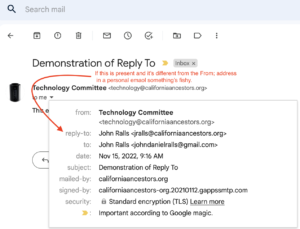
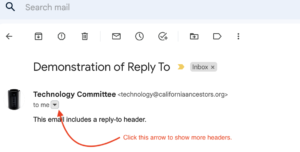
On the emails I’ve seen there is a sign that it’s not legitimate: They have a “Reply-To:” address set, usually to the same user as the “From:” address but on a different service. For example, the From: address might be [email protected] and the Reply-To: address [email protected]. My usual email client (Apple Mail) automatically displays the extra address if it’s present. The GMail web interface will display it if you click the little reveal arrow next to the sender. Below is an illustration:

It will show you more information about the email:

If you see a “reply-to” entry that means that if you just click “reply” the email will go to that address instead of the From address. For a personal email from an individual, that’s suspicious. The scammers use that to try to keep replies from alerting the original owner to the scam.

If you get one of these emails don’t reply to it and don’t try to use the “From:” address either. In three of the four cases I saw recently, the email account had been taken over by the criminal. In at least one case the criminal had taken over the user’s cell phone and used it to take over all of the user’s email accounts. The safest way to tell someone their email has been hacked is to visit them in person or telephone them on their land-line phone. I don’t recommend trying to use the victim’s cell phone number because if it has been compromised that will reveal your phone number to the criminal.

Secure your own email account

The other important thing is to protect your email address against being taken over. The best protection is the standard security advice: Use a strong password generated by a password manager. If your computers (that phone in your pocket is really a computer that happens to be able to do cellular voice communication) have fingerprint or face recognition, use it. If your email provider supports two-factor authentication, turn it on. Prefer using an authenticator app over text messages: It’s possible for a criminal to take over your phone number and get your text messages, but using an authenticator app requires physical posession of the computer it’s installed on.

Always practice good security hygiene. Never click on a link you receive in email unless you’re absolutely sure that you know and trust the sender. Keep your software up to date, especially the operating system and web browser. If your computer, including the one you call a phone, is so old that it’s not getting updates any more then it needs to be replaced. Note that users of Microsoft Windows computers that can’t run Windows 10 or Windows 11 can install ChromeOS or Linux instead and resume getting security updates. Use a password manager and let it generate passwords for you. All of the current web browsers have one built in. Don’t reuse passwords between websites, to limit the damage if one gets compromised, and change the important ones periodically, where important means that there’s money or important personal information attached.