To register for an event or for more information, click the link for any event. All times are Pacific Time.
Questions? Email [email protected]
A little while back (How to Read A Blog), I talked about different ways to read a blog and mentioned blog aggregators. They honestly aren’t as scary as they sound, but I did want to explore a bit before I could recommend one. To recap, you likely get this blog in your email. If you subscribe to other blogs, you likely get those in your email. So you can have… well… a lot of email. Maybe this is great for you. But if it’s not, you have some other choices:
- You can bookmark each blog site and visit when you want to.
- You can use an aggregator that will pull all your blogs into one newspaper-looking thing so that you can review all at once.
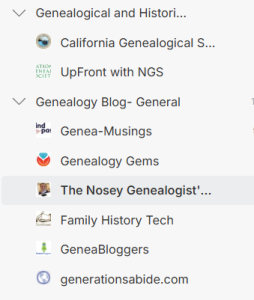
After playing around with a few of these newspaper-looking things (blog aggregators), I landed on Feedly. It has a clean look-and-feel and if you want to get fancy, you can do that, too. You can follow blogs, news sites, YouTube channels, and even put keyword alerts in one place. This one place is created using something that sounds “techy” but really is not. RSS-based approach. Techy, right? Nope! Stands for, “Really Simple Syndication.” Really. Simple.
You can use RSS to directly subscribe to a blog’s feed, so you see new posts without visiting each site individually. With Feedly, you can organize subscriptions into themes (maybe “Genealogical Society Blogs”, “Blogs from Tennessee,” “Fun Blogs,” “Knitting Blogs”). This can keep your reading organized so that if you don’t have your knitting needles with you, you can wait to see those blogs.
How to Start Using Feedly: Step-by-Step
- Create Your Feedly Account
- Go to feedly.com.
- Click Get started for free.
- Sign up with your Google, Apple, or email account.
- Set Up Your First Feeds
- After logging in, you’ll see a search bar at the top.
- Enter the name or URL of a blog, website, or topic you want to follow (e.g., “The Legal Genealogist”).
- From the search results, select the feed you want and click Follow.
- Organize Your Feeds into Collections
- When prompted, create a new collection (folder) name, like “Genealogy” or “News.”
- Add feeds to existing collections or create new ones to keep topics organized.
- Explore and Customize Your Feed
- Click on a collection to see new posts from all feeds within it.
- Use the settings menu (gear icon) to customize how many articles to show and the view style (titles only, magazine layout, etc.).
- Save, Share, and Integrate
- Click the bookmark icon on articles you want to save for later.
- Use the share button to email or post articles to social media.
- Link Feedly to apps like Evernote, Pocket, or Trello to save or manage content across your workflow.
Using Feedly effectively starts with curating your sources carefully. Begin by subscribing to blogs you already know and trust. Then, explore Feedly’s “Discover” feature, which suggests new feeds based on your reading habits and topics of interest. Avoid the temptation to over-subscribe; the best results come from quality over quantity. Too many feeds can lead to “information fatigue,” where valuable articles get lost in the noise.
Here are some excellent genealogy feeds and blogs you can add to your Feedly to get started:
- California Genealogical Society Blog—This one!!! All kinds of genealogy junk just for you. Updates three times a week with Monday focused on whatever the author feels like, Wednesdays for CGS items, and Fridays for what’s coming up.
Feed URL: https://www.californiaancestors.org/feed/ - The Legal Genealogist — Judy G. Russell’s blog covers legal and historical topics that impact genealogy research. Frequent updates with practical insights and case studies.
Feed URL: https://www.legalgenealogist.com/feed/ - Family Tree Magazine Blog — Offers how-tos, records updates, DNA research tips, and news from the genealogy world. Great for beginners and advanced researchers alike.
Feed URL: https://www.familytreemagazine.com/feed/ - Newspapers.com Blog — Regular tips on how to use historic newspapers in genealogy and stories about newspaper discoveries.
Feed URL: https://blog.newspapers.com/feed/
Do you have any others you recommend?
Helpful Links
Events: https://www.californiaancestors.org/events-and-education/
Special Interest Groups: https://www.californiaancestors.org/special-interest-groups-for-members/
Calendar view: https://www.californiaancestors.org/cgs_calendar/
Tips & Talk: Oakland FamilySearch Center Family History Classes: https://www.familysearch.org/en/centers/oakland_california/classes